








Peplink care plan for -PRM devices
Peplink PrimeCare: Warranty, InControl, SpeedFusion
Updates arrive remotely, the renewal on time: nobody in the business notices a thing.
- Closing time at the bakery. Nobody thinks about the router any more.
- At night the update arrives remotely. Only the cat is watching.
- In the morning the baker unlocks. She knows nothing of the update.
- The update came overnight, the till runs: nobody had to do a thing.
The principle at a glance
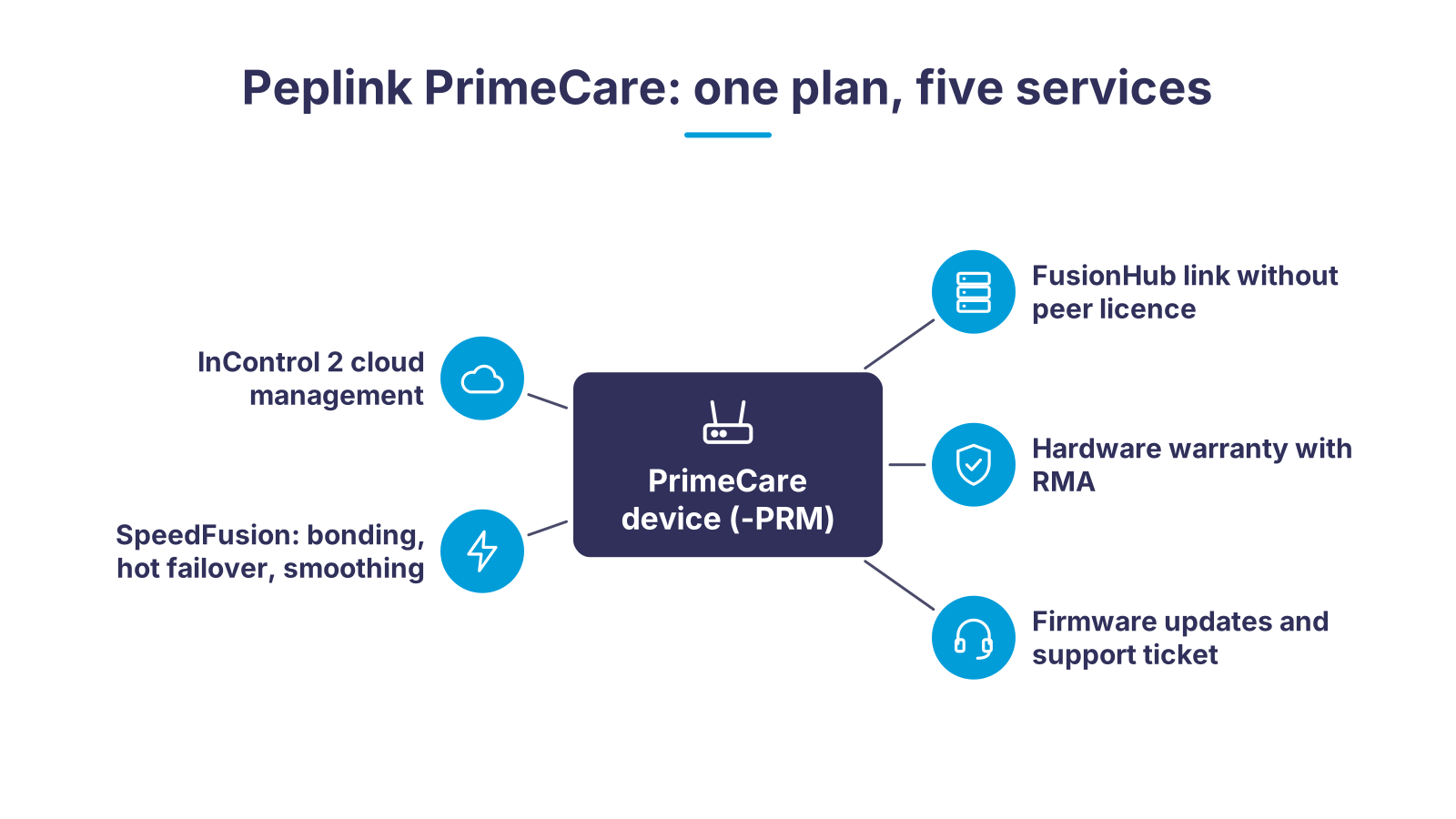
At the centre is your Peplink device whose part number ends in -PRM. As long as its PrimeCare subscription is valid, five benefits are attached to it: InControl 2 cloud management, the full SpeedFusion features (bonding, Hot Failover, WAN Smoothing), the FusionHub licence without counting towards the peer limit, the hardware warranty with standard RMA, plus firmware upgrades and the Peplink support ticket. When the subscription expires, the device keeps routing, but the five benefits are switched off.
What PrimeCare solves for you
A SpeedFusion network consists of devices, licences, cloud management and warranty. Without PrimeCare you buy these separately and manage four terms. With PrimeCare it is one plan per device.
Faulty device, site at a standstill
Configuration without a site visit
One link fails, the call drops
FusionHub peers that cost licences
Four licences, four expiry dates
Nobody reachable when things go wrong
PrimeCare, PrimeCare+ or without a valid subscription
| PrimeCare (PRM-) | PrimeCare+ (PCP-) | Without a valid subscription | |
|---|---|---|---|
| InControl 2 cloud management | Included | Included | Disabled, local web interface only |
| Hardware warranty | Standard RMA: replacement after the faulty device is received | Advance Hardware Replacement: replacement is shipped in advance | Not applicable (PrimeCare benefit) |
| Technical support (Peplink ticket) | Support ticket 8×5 | Support ticket 24×7 | – |
| SpeedFusion features (bonding, Hot Failover, smoothing) | Fully unlocked | Fully unlocked | Disabled (on affected models) |
| FusionHub licence | Connection without counting towards the peer limit | Connection without counting towards the peer limit | Disabled |
| Firmware upgrades | Included | Included | – |
| SpeedFusion Connect and InTouch | Available | Available | – |
| Applies to | Peplink models with the -PRM suffix | Peplink models with the -PRM suffix | All -PRM devices after expiry or non-renewal |
How PrimeCare works with Ascend
- 1Choose a device with -PRMYou buy a Peplink router whose part number ends in -PRM, for example MAX BR1 Pro 5G, Balance 20X or B One. The first PrimeCare year is included in the device price.
- 2Configuration and rolloutOn request, Ascend takes care of configuration and rollout: we set up the device and InControl management and connect it to your own FusionHub or one hosted by Ascend.
- 3Operation with SpeedFusion and FusionHubThe device bonds its WAN paths via SpeedFusion and connects to your FusionHub or a hub hosted by Ascend, without a peer licence per device.
- 4Renewal before expiryBefore the first year ends, you order PrimeCare or PrimeCare+ for 1, 2 or 4 years in the Ascend Shop. The licence class depends on the model (PrimeCare A for B One, Balance 20X and the BR1 Mini series; larger MAX models such as BR1 Pro 5G or Transit Pro E need PrimeCare C); you will find the right class on the product page, or we will tell you. The licence is activated once payment is received and, according to Peplink, takes effect within about an hour.
What Peplink PrimeCare includes in detail

Picture a small bakery on a perfectly ordinary evening. The baker hangs her apron on the hook and calls it a day. On the shelf next to her, a Peplink router with PrimeCare has been sitting for a year, carrying the till and the card terminal. She stopped thinking about it long ago.
PrimeCare is Peplink's care plan for devices whose part number ends in -PRM. It bundles four things that you license individually on other Peplink models: InControl 2 cloud management, a hardware warranty, the SpeedFusion licence and the FusionHub licence. On top come firmware upgrades, the Peplink support ticket and access to SpeedFusion Connect and InTouch.
InControl 2
In the bakery from our example, the router receives new firmware that night, remotely through InControl 2. The shop is dark and nobody is at the till. For a while the lights on the device change colour, then they glow steadily again. The only one watching is the cat from next door.
With InControl 2 you build network topologies in the cloud and push them to the devices within minutes. You see the status of every site, change configurations remotely, distribute firmware in batches and standardise VLAN, SSID, firewall and outbound rules. Schedules for SSIDs, Wi-Fi radios and PoE ports on the SD switches are included as well.

SpeedFusion and FusionHub
On the affected models, PrimeCare unlocks the full SpeedFusion features: bandwidth bonding, Hot Failover and WAN Smoothing. At the same time, the device may connect to any FusionHub without counting towards its peer limit. The throughput limit of the FusionHub stays unchanged; according to Peplink, FusionHub Essential delivers 100 Mbps regardless of the number of connected peers. So size the hub by bandwidth, not by device count.
Warranty and support
PrimeCare covers manufacturing defects through standard RMA: Peplink replaces the device after the faulty one has been received. PrimeCare+ adds Advance Hardware Replacement, where the replacement unit is shipped in advance, and raises the Peplink support ticket from 8×5 to 24×7. Ascend support is available to existing customers around the clock regardless.
Small extras with a big impact
According to Peplink, PrimeCare allows a virtual WAN on a VLAN (on a WAN or LAN port) and the activation of your own consumer eSIMs (BYO eSIM), and on the BR1 Mini series it unlocks Wi-Fi WAN and the dedicated WAN port. For a small router, that is the difference between one and two links.
Who PrimeCare is worth it for
PrimeCare fits wherever several Peplink devices are managed centrally and an outage costs money. Three typical fields of use:
Branches and site networking. One Balance 20X or B One per site, all in one InControl 2 organisation, SpeedFusion tunnels to a FusionHub in your data centre or at Ascend. You bring new sites online through the zero-touch configuration of InControl 2. The FusionHub licence does not grow with the number of branches.
Vehicles, OB vans and construction sites. MAX BR1 Pro 5G, MAX Transit Pro E or MAX BR2 bond several mobile networks via SpeedFusion. Hot Failover and WAN Smoothing keep the live stream or the video call going when a cell drops. If a device fails in the field, PrimeCare+ with advance replacement is the right choice.
Operators with many small devices. BR1 Mini, BR2 Micro or B One Plus in IoT projects, kiosks or metering stations. Here PrimeCare provides central management and the warranty for devices you never want to touch again.
PrimeCare makes no sense if you run a single router without cloud management and without bonding. In that case the local web interface is enough after the first year, and you only renew if you really need the warranty or InControl.
What Ascend takes care of for you

The next morning the baker from our example unlocks the shop, and the first customer is already waiting at the door. She knows nothing about the update during the night. Nor does she know that her PrimeCare plan was renewed a few weeks ago, before the first year was up. Her service provider took care of both.
Ascend is a Peplink Certified Gold Partner and authorised Peplink e-tailer; our engineers are certified as Peplink Certified Engineers (PCE) and train others themselves as PCE trainers. For PrimeCare, that means:
- Delivery. We supply the -PRM device; according to Peplink, the first PrimeCare year is included in the device purchase.
- Configuration and rollout. On request, we configure the devices before rollout and take over InControl management of your Peplink fleet.
- Hosted FusionHub / SpeedFusion. If you do not run your own data centre, you use a FusionHub hosted by Ascend with SpeedFusion.
- Renewal. You order PrimeCare and PrimeCare+ for 1, 2 or 4 years in the Ascend Shop; the licence is activated once payment is received. The licence class depends on the model: PrimeCare A applies to B One, Balance 20X and the BR1 Mini series, PrimeCare B to B One 5G, BR1 Pro (CAT-20), BR2 Micro and BR2, PrimeCare C to BR1 Pro 5G, Transit 5G, Transit Pro E and Transit Core; the right class is shown on the product page in the shop, or we will tell you. When you switch from PrimeCare to PrimeCare+, Peplink credits the remaining term pro rata.
- 24×7 support for existing customers. The Peplink ticket is part of the plan; our own support is available to existing customers around the clock and knows your installation.
Ascend has been on the market since 2010. More than 15 years of experience from network projects go into every configuration.
Expiry and reinstatement: Peplink's rules
A PrimeCare device without a valid subscription keeps routing and stays configurable through the local web interface. According to Peplink, InControl 2, the FusionHub licence, the SpeedFusion features and the warranty are switched off. Peplink's care plan terms apply to renewal: before expiry and up to 30 days after, you renew without a check, and the new term starts the day after expiry. If expiry was more than 30 days ago, you submit a diagnostic report through the Peplink ticket system, which must not be older than 14 days and must pass the check; the new term then starts on the purchase date. PrimeCare licences are non-transferable and non-refundable. The binding sources are the Peplink PrimeCare page and the Peplink care plan terms and conditions.
Matching hardware in the Ascend Shop
Devices with the -PRM suffix come with the first PrimeCare year. Renewal depends on the licence class of the model: PrimeCare A for B One, Balance 20X, BR1 Mini, Transit Mini, B One Plus, BR1 Mini M2M and BR1 Mini 5G; PrimeCare B for B One 5G, BR1 Pro (CAT-20), UBR, BR2 Micro and BR2; PrimeCare C for BR1 Pro 5G, Transit 5G, Transit Pro E and Transit Core. The class is shown on every licence product page in the shop.
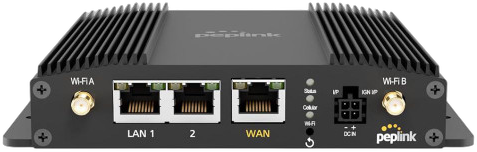
Peplink MAX BR1 Pro 5G
5G router for vehicles and remote sites; part number MAX-BR1-PRO-5GN-T-PRM with the first PrimeCare year.
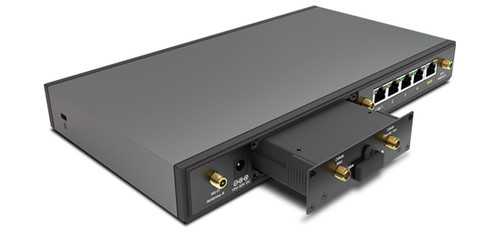
Peplink Balance 20X
SD-WAN router for branches with integrated LTE modem; BPL-021X-LTE-E-T-PRM, PrimeCare model.
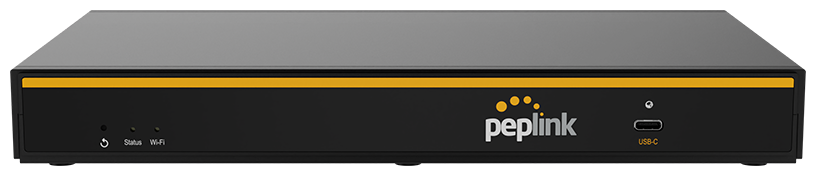
Peplink B One
Branch router with Wi-Fi 6 for small sites; B-ONE-T-PRM, PrimeCare model.
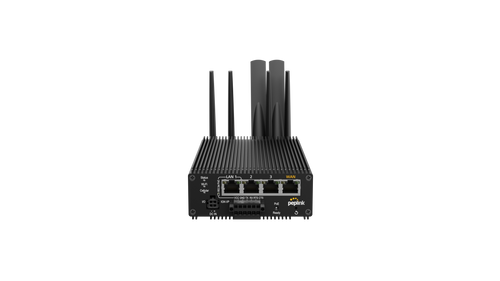
Peplink MAX Transit Pro E
5G router for transport and OB vans; MAX-TST-PROE-5GN-T-PRM, PrimeCare model.
- PrimeCare A (1 year) – for B One, Balance 20X, BR1 Mini
PrimeCare A (1 year) – for B One, Balance 20X, BR1 Mini
Renewal PRM-A-1Y for B One, Balance 20X, BR1 Mini, Transit Mini, B One Plus, BR1 Mini M2M and BR1 Mini 5G: SpeedFusion, hardware warranty, firmware upgrades and InControl 2 for another year. Also available as a 2- and 4-year licence.

PrimeCare+ A (1 year) – for B One, Balance 20X, BR1 Mini
Renewal PCP-A-1Y for the same models as PrimeCare A: plus Advance Hardware Replacement and Peplink support 24×7. Also available as a 2- and 4-year licence.
- PrimeCare C (1 year) – for BR1 Pro 5G, Transit Pro E
PrimeCare C (1 year) – for BR1 Pro 5G, Transit Pro E
Renewal PRM-C-1Y for BR1 Pro 5G, Transit 5G, Transit Pro E (5G) and Transit Core (5G): SpeedFusion, hardware warranty, firmware upgrades and InControl 2 for another year. Also available as a 2- and 4-year licence.
- PrimeCare+ C (1 year) – for BR1 Pro 5G, Transit Pro E
PrimeCare+ C (1 year) – for BR1 Pro 5G, Transit Pro E
Renewal PCP-C-1Y for the same models as PrimeCare C: plus Advance Hardware Replacement and Peplink support 24×7. Also available as a 2- and 4-year licence.
Frequently asked questions about Peplink PrimeCare
Related links
A morning like any other
And the bakery from our example? The customer holds his card to the terminal, it beeps, and the rolls go over the counter. A morning like any other. That is exactly the point of a care plan: you can tell it is working because nothing stands out.
The bakery is only an example. With many branches, a vehicle fleet or an outside broadcast van it is the same plan: one subscription per device with one expiry date that somebody keeps an eye on. We will gladly check for you which of your devices expire when.

Which of your Peplink devices are about to leave PrimeCare?
Send us serial numbers or your InControl organisation. We check terms and models, recommend PrimeCare or PrimeCare+ and take care of the renewal.
Request PrimeCare advice
Tell us your device models, the number of sites and whether you use your own or a hosted FusionHub. We will get back to you shortly with a recommendation.